

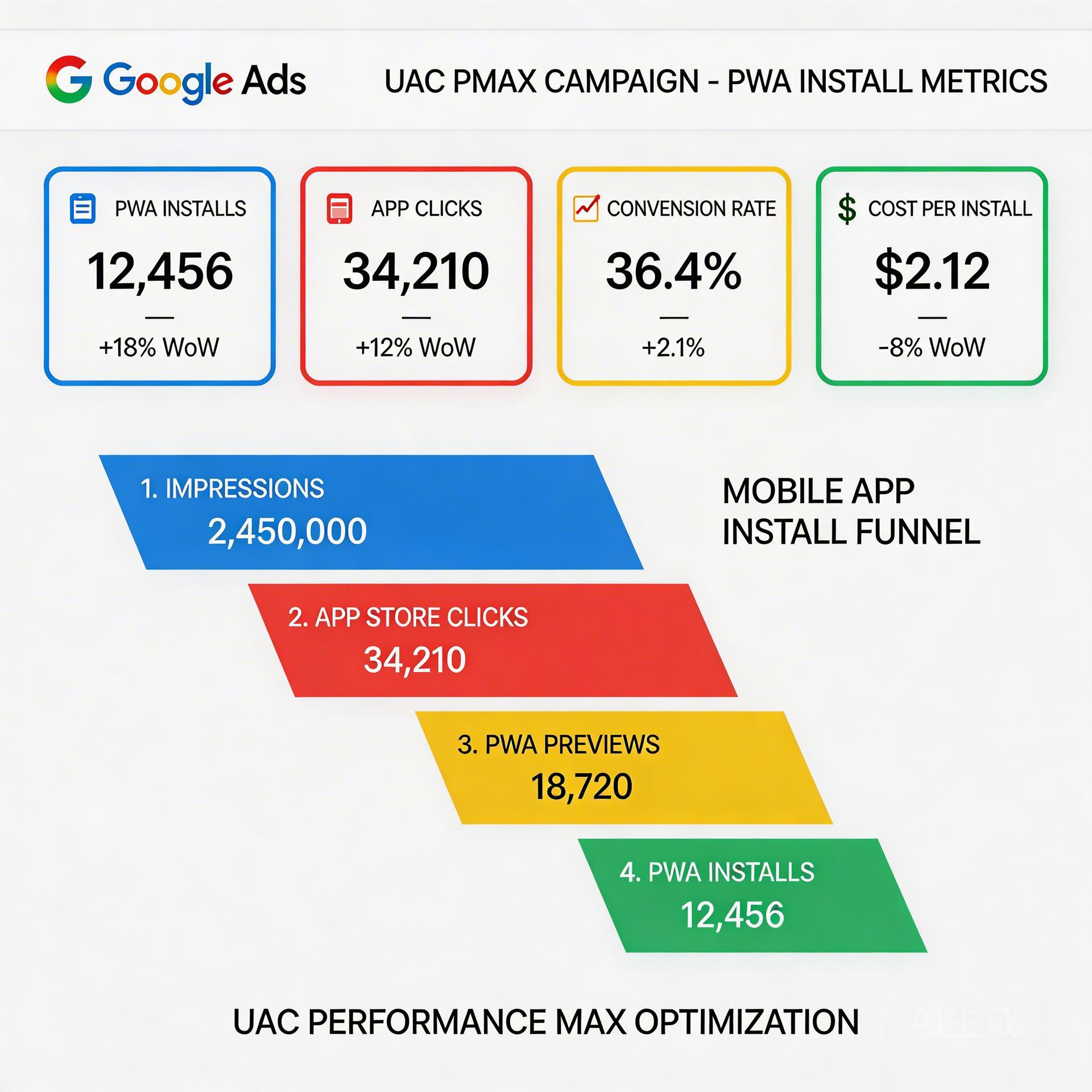
Google Ads has become the primary paid acquisition channel for Android app teams running installs at scale. And in 2026, a growing share of those teams are routing traffic not to the Google Play Store — but directly to a Progressive Web App (PWA). The combination of Google Ads UAC/PMAX campaigns with PWA install flows is quietly becoming the dominant strategy for mobile game BCs and AI social app teams targeting emerging markets.
Why? Three reasons: lower cost per install, faster go-to-market, and no 30% Google Play revenue cut. When you run Google Ads to a PWA, every dollar of ad budget converts at a higher rate — and every dollar of in-app revenue stays with the publisher.
→ Want to bypass Google Play entirely? See how ROiBest PWA works — no submission, no cut, 1.2x installs.
Why Combine Google Ads with PWA for App Installs in 2026
The classic Google Ads app install funnel sends clicks to the Google Play Store. Google’s UAC and Performance Max (PMAX) campaigns have been optimized for this flow for years. But this flow has a major friction point: the Play Store itself. Users are asked to leave their browser, open the Play Store, wait for a download, grant permissions, and then launch the app. Each step is a drop-off point.
PWA installs bypass this friction entirely. When a user clicks a Google Ad and lands on a PWA-enabled site, they can install the app directly from the browser — with a single tap on an “Add to Home Screen” prompt. No Play Store redirect. No waiting. No download bar. The install happens in seconds.
This is why ROiBest clients consistently see PWA install conversion rates running 1.2x higher than equivalent native app store campaigns. It’s not a marginal improvement — it’s a structural one. The funnel simply has fewer steps.
For Google Ads teams, this changes the unit economics of every campaign. If you’re converting at 1.2x the rate on the same ad spend, your effective CPI drops proportionally. And because there’s no 30% Google Play commission on in-app purchases, your LTV per user is materially higher from day one.
The other major shift in 2026 is Google’s own platform. PMAX campaigns now support web conversion goals, which means you can optimize directly for PWA install events — not just Play Store installs. Google’s smart bidding signals work just as well (sometimes better) with web-based install events when the GA4 integration is properly configured.
Google UAC Campaigns for PWA: Setup and Optimization

Universal App Campaigns (UAC) were built to drive app installs at scale using Google’s full inventory: Search, Display, YouTube, Discover, and Play. Traditionally, UAC required a Play Store listing as the destination. But with PWA as your install destination, you have more flexibility — and more control.
The key shift is in campaign type selection. Rather than running a standard app install UAC, teams running PWA installs use web conversion campaigns with the install event defined in GA4. This gives you access to the same Google inventory with conversion goals tied to your PWA install event (typically `pwa_installed`).
Campaign configuration best practices for PWA UAC:
- Set your primary conversion action to the `pwa_installed` event from GA4
- Start with Target CPA bidding at 2–3x your historical CPI to give the algorithm room to learn
- Run a minimum 14-day learning phase before evaluating CPA performance
- Use all available ad formats: text, image, video — Google’s algorithm allocates spend based on performance
- Set geography targeting to your highest-intent markets first; expand once CPA stabilizes
- Ensure your PWA landing page loads in under 2 seconds on mobile — this directly impacts Quality Score and install conversion rate
One frequently overlooked optimization: the post-install experience. Google’s UAC algorithm optimizes for install quality, not just volume. If your PWA session depth after install is strong (users opening the app, completing onboarding, transacting), the algorithm will find more users like that. ROiBest’s PWA setup includes post-install event tracking out of the box, which feeds this signal back to Google Ads automatically.
For budget allocation, start with at minimum $50/day per campaign to ensure sufficient data for smart bidding. Campaigns starved of data take longer to exit the learning phase and often plateau at suboptimal CPAs.
PMAX Campaigns for Android PWA Apps: Best Practices
Performance Max (PMAX) is Google’s most powerful campaign type for reach and scale. It uses AI to allocate budget across all Google channels simultaneously — Search, Shopping, YouTube, Display, Discover, Gmail, and Maps — optimizing toward your specified conversion goals.
For PWA install campaigns, PMAX offers a significant advantage: it can reach users earlier in the intent funnel through YouTube and Display, warming them up before they see a Search or Discover ad that drives the install. This multi-touch approach typically produces a lower blended CPI compared to single-channel campaigns.
PMAX asset group strategy for PWA campaigns:
- Create separate asset groups by audience signal: gaming audiences, utility app users, and lookalikes of your existing PWA installs
- Upload at least 5 image assets, 5 headline variations, 3 description lines, and 1–2 videos per asset group
- Use your PWA landing page URL (not the Play Store) as the final URL
- Enable URL expansion only if your site structure supports it — for single-product PWA campaigns, disable URL expansion to maintain install funnel control
- Set audience signals using Customer Match lists from existing installs if available
PMAX campaigns require patience. The first 2–4 weeks are a learning phase where performance may appear erratic. Resist the urge to adjust bids or budgets during this period — changes reset the learning phase. Set your target ROAS or target CPA, fund the campaign adequately, and evaluate after the learning phase is complete.
One nuance specific to PWA campaigns: because PMAX optimizes for web conversions, it has no Play Store install data to fall back on. This means your GA4 event setup is critical. A missing or mis-tagged `pwa_installed` event will cause PMAX to optimize for the wrong signal. ROiBest’s implementation ensures this event is correctly configured before any campaign goes live.
Bidding Strategies: Target CPI vs Target ROAS for PWA Install Campaigns
The bidding strategy you choose determines how Google allocates your budget — and ultimately, the quality of installs you receive. For PWA campaigns, the two most relevant strategies are Target CPA (which maps to Target CPI for install campaigns) and Target ROAS.
Target CPA / Target CPI is the right starting point for most PWA install campaigns. You define a target cost per install, and Google’s algorithm finds users most likely to install within that cost constraint. This strategy is ideal when:
- You’re launching a new campaign without historical ROAS data
- Your primary goal is install volume at a controlled cost
- You’re in a competitive market where CPI benchmarks are well-established
Target ROAS is the more powerful strategy once you have in-app purchase data flowing through GA4. Instead of optimizing for installs, Google optimizes for users most likely to generate revenue. For mobile game BCs and AI social apps with subscription or in-app purchase revenue, Target ROAS often produces dramatically better unit economics — even if the raw install volume is lower.
The transition from Target CPA to Target ROAS should happen once you have at least 30–50 in-app purchase events per week attributable to Google Ads. Before that threshold, the algorithm lacks sufficient data to optimize reliably for ROAS.
Bidding benchmarks for PWA campaigns in 2026:
- Mobile game BC campaigns: Target CPI $0.30–$0.80 for Tier 3 markets; $1.50–$3.00 for Tier 1
- AI social app campaigns: Target CPI $0.50–$1.20 for Tier 3; $2.00–$4.00 for Tier 1
- Target ROAS for gaming: 150–300% depending on LTV curve
- Target ROAS for subscription AI apps: 200–400% on day-7 ROAS
Because PWA installs convert at 1.2x the rate of Play Store installs on the same traffic, your effective CPI is inherently lower when targeting the same audience. Teams migrating from Play Store campaigns to PWA campaigns often see 15–25% CPI improvement in the first 30 days, without any change to bidding strategy.
Creative Strategy for Google Ads PWA Campaigns
Creative is the single highest-leverage variable in Google Ads performance after audience targeting. For PWA campaigns, creative strategy has some unique considerations compared to traditional app install campaigns.
The most important creative principle: show the install moment. Users unfamiliar with PWA need to understand that your app can be installed directly from their browser — and that it works like a native app. Creative assets that show the “Add to Home Screen” prompt, the app icon appearing on the home screen, and the app launching fullscreen have consistently outperformed generic app feature ads in ROiBest client campaigns.
Creative formats by channel:
- YouTube in-stream (6s bumpers and 15s skippable): Lead with the value proposition in the first 5 seconds. Show the app in action, then show the install prompt. End with a clear CTA: “Install free” or “Play now.”
- Display/Discovery: Use high-contrast visuals with a clear app icon and a short benefit headline. “No download needed” and “Install in 1 tap” perform well for PWA-specific messaging.
- Search responsive ads: Include “PWA,” “install instantly,” and your app category in headlines. Use benefit-focused descriptions rather than feature lists.
For mobile game BCs, gameplay footage is your most valuable creative asset. 15-second clips showing the game’s core loop — particularly the moment of reward or progression — consistently outperform feature-focused ads. Pair this with a PWA-specific install sequence and you have a high-converting ad unit.
For AI social apps, the emotional hook is the output — show what the AI creates, generates, or enables in the first 3 seconds. Users don’t install AI apps to use AI; they install them for the result. Lead with the result.
Refresh creatives every 3–4 weeks. PMAX and UAC campaigns are particularly sensitive to creative fatigue — the algorithm will stop serving underperforming assets, but if all your assets are fatigued, overall campaign performance degrades. Maintain a pipeline of at least 3–4 new creative variations per month for active campaigns.
GA4 Tracking and Conversion Setup for PWA Installs
Accurate conversion tracking is the foundation of any performance Google Ads campaign. For PWA install campaigns, GA4 is the primary measurement layer — and the configuration must be precise for smart bidding to work correctly.
The core conversion event for PWA campaigns is `pwa_installed`. This event fires when a user adds the PWA to their home screen via the browser install prompt. It’s distinct from a page visit or a Play Store click — it’s the actual install moment, equivalent to a Play Store download for attribution purposes.
GA4 setup requirements for PWA install campaigns:
- Mark `pwa_installed` as a conversion event in GA4
- Import this conversion into Google Ads via the GA4 linking integration
- Set conversion window to 7 days (aligns with standard app install attribution windows)
- Enable enhanced conversions to improve signal quality in a cookieless environment
- Set up secondary conversion events: first_open, tutorial_complete, purchase — these feed into ROAS optimization
One common mistake: counting the install prompt impression as a conversion rather than the actual install confirmation. This inflates conversion numbers and teaches the algorithm to optimize for users who see the prompt — not users who actually install. ROiBest’s GA4 setup fires the `pwa_installed` event only on confirmed installation, which produces accurate CPI data that matches business reality.
For teams running both Play Store and PWA campaigns simultaneously, use separate Google Ads conversion actions for each. Blending Play Store installs with PWA installs in a single conversion action makes it impossible to optimize campaigns independently and obscures the true CPI for each channel.
Google Ads Data Manager (launched in 2025) also supports direct PWA install event ingestion via first-party data pipelines. For high-volume campaigns (1,000+ installs/day), this provides more robust signal than GA4 alone and is worth configuring with ROiBest’s implementation team.
For BC Mobile Games: Google Ads + PWA Install Economics
Mobile game BCs (business clients operating game distribution businesses) have a specific economic model that makes Google Ads + PWA particularly compelling. Game BCs typically operate on tight CPI targets, require fast time-to-market for trending titles, and are acutely sensitive to platform commission structures.
Let’s look at the economics. A game generating $5.00 LTV per user, running on Google Play, with a 30% commission structure, yields $3.50 net LTV per user. At a $1.00 CPI, the ROI is 2.5x. Now run the same game as a PWA: $5.00 LTV, no platform commission, full $5.00 net LTV. At the same $1.00 CPI — which is actually lower because PWA converts at 1.2x — the ROI is 4.0x+.
That’s not a marginal improvement. That’s the difference between a profitable campaign and a highly profitable campaign.
Beyond economics, PWA solves two major operational problems for game BCs:
Time-to-market: Google Play app review can take 3–7 days for new submissions and 1–3 days for updates. For BCs chasing trending titles or seasonal events, this delay has real cost. PWA goes live instantly — ROiBest can deploy a new PWA in hours, not days. When a new game trend emerges, BC teams using PWA can be buying traffic the same day.
Review risk: Play Store rejection or suspension can kill a campaign mid-flight. BC teams that have built up install momentum and then face a sudden Play Store suspension lose not just future installs but often their campaign history and quality scores. PWA has no submission review, so there’s no rejection risk. If a title needs to be updated, it updates instantly without re-review.
For game BCs currently running Play Store campaigns, the migration path to PWA is straightforward with ROiBest. Existing Google Ads campaigns are redirected from Play Store URLs to PWA landing pages, conversion events are re-mapped to `pwa_installed`, and bidding is recalibrated based on the higher install conversion rate. Most BC clients see positive CPI impact within the first billing cycle.
For AI Social Apps: Google Ads + PWA to Bypass Review Risk
AI social apps — photo editors, avatar generators, AI companions, AI-powered dating features — face a specific challenge on Google Play that has intensified in 2026. Google’s March 4, 2026 policy update on age-restricted content and AI-generated imagery has created a new layer of review risk for AI social apps. Apps that include any AI generation capabilities for user photos or avatars now face enhanced review scrutiny, with some categories subject to indefinite review holds.
For AI social app teams running Google Ads to acquire users, a Play Store review hold means zero incoming installs — even if the campaign is funded and delivering clicks. This is an existential risk for teams with monthly CPI targets and active user acquisition funnels.
PWA eliminates this risk entirely. There is no Google Play submission for PWA. The AI social app is deployed as a web app, installable directly from the browser, with full native-like functionality including push notifications, offline mode, and home screen presence. Google Ads campaigns run continuously to the PWA landing page, with no dependency on Play Store review status.
Teams that have migrated from Play Store to PWA for AI social apps report several additional benefits beyond review avoidance:
- Faster feature iteration: No review required for feature updates, so AI model improvements and UI changes ship the same day
- Push notification retention: PWA push notifications work even after the user “uninstalls” (removes from home screen), providing a retention channel that Play Store apps lose on uninstall
- User data ownership: No Play Store intermediary means full first-party data on all user actions, improving both GA4 signal quality and ad targeting
For Google Ads targeting, AI social apps benefit particularly from YouTube in-stream creative — the output quality of AI generation is highly visual and demonstrates well in video format. PMAX campaigns with strong video assets and lookalike audience signals from existing installs have produced sub-$1.00 CPIs for AI social apps in Tier 3 markets when running to PWA landing pages.
Key Metrics and Benchmarks: CPI, ROAS, Install Rate
Performance benchmarks help Google Ads teams set realistic targets and identify when campaigns are underperforming. The following benchmarks are based on ROiBest client data from 2025–2026 across Android PWA install campaigns.
Install Conversion Rate (landing page visit to install):
- PWA install campaigns: 8–15% average install rate on qualified traffic
- Play Store redirect campaigns: 6–12% average (PWA advantage: 1.2x)
- Top-performing PWA campaigns: 20%+ install rate (optimized landing page + high-intent audience)
Cost Per Install (CPI) by market tier:
- Tier 3 (SEA, SA, LATAM): $0.20–$0.60 PWA CPI for mobile games; $0.40–$1.00 for AI apps
- Tier 2 (Brazil, Mexico, Indonesia): $0.50–$1.50 PWA CPI for mobile games; $1.00–$2.00 for AI apps
- Tier 1 (US, UK, DE, AU): $1.50–$4.00 PWA CPI for mobile games; $2.50–$6.00 for AI apps
ROAS benchmarks (day-7):
- Mobile game BCs targeting Tier 3: 200–400% day-7 ROAS
- AI social apps with subscription: 150–250% day-7 ROAS
- Top-performing campaigns with strong creative and audience: 500%+ day-7 ROAS
Key leading indicators to monitor daily:
- CTR (Click Through Rate): below 1% indicates creative fatigue or audience mismatch
- Landing page bounce rate: above 70% suggests landing page–ad misalignment
- Install prompt acceptance rate: the % of users who see the install prompt and accept — below 40% indicates UX issues with the install flow
- Post-install D1 retention: below 30% signals a gap between ad creative and actual app experience
When CPI rises above target by more than 30%, the standard diagnostic is: check creative fatigue first, then audience saturation, then landing page performance. In most cases, creative refresh resolves the CPI issue without needing to modify campaign structure or bidding.
Action Plan: Launch Your First Google Ads PWA Campaign
If you’re ready to launch a Google Ads PWA install campaign, here’s the step-by-step action plan used by ROiBest clients:
Week 1: PWA Setup and Tracking (ROiBest handles this)
- ROiBest deploys your PWA — no technical work required from your team
- GA4 property configured with `pwa_installed` and secondary conversion events
- GA4 linked to Google Ads account
- Conversion actions imported and verified in Google Ads
- PWA landing page speed optimized (target: <2s load on 4G mobile)
Week 2: Campaign Launch
- Launch PMAX or web conversion campaign targeting your primary geography
- Set Target CPA at 2–3x expected CPI to allow algorithm flexibility
- Upload full creative asset suite: 5+ images, 5+ headlines, 3+ descriptions, 1–2 videos
- Set daily budget at minimum $50/day; $100+/day for faster learning
- Add audience signals: competitor app users, category intent audiences
Weeks 3–4: Learning Phase Monitoring
- Do not adjust bids or budgets during the learning phase (first 14 days)
- Monitor install rate and post-install D1/D7 retention daily
- Identify top-performing asset groups for creative learnings
- Check GA4 event data to confirm conversion tracking accuracy
Month 2: Optimization and Scale
- Tighten Target CPA to reflect actual observed CPI
- Transition to Target ROAS once 30+ in-app purchase events are tracked per week
- Expand geography to additional markets using top-performing creatives
- Launch additional PMAX asset groups for new audience segments
- Refresh creative assets; retire underperformers
The teams that scale fastest with Google Ads PWA campaigns are those that treat the first 30 days as a data-collection and learning phase — not a performance phase. Resist pressure to optimize prematurely. Give the algorithm the data it needs, and month 2 performance will reflect that investment.
ROiBest clients who follow this launch sequence consistently see CPI below market benchmarks by month 3, with strong ROAS trajectories as the campaign accumulates in-app purchase signal for smart bidding.
Skip the app store. Go live instantly, keep 100% of your revenue.
ROiBest helps Android app teams launch PWAs — no review process, no 30% Google Play cut, and push notifications that work even after uninstall. Teams see up to 1.2x higher install conversion rates vs native app downloads.
发表回复