

Google Performance Max has become the default campaign type for Android app installs, but most teams are running PMax the same way they ran Universal App Campaigns in 2021 — with a single destination, minimal asset variation, and no channel-specific optimization strategy. The result: cost per install that’s 30–50% higher than it needs to be.
In 2026, the teams driving the lowest CPI from PMax are using a fundamentally different approach: PWA as the install destination, channel-matched assets, and conversion signals that give the algorithm something meaningful to optimize against. This guide breaks down exactly how to structure your PMax campaigns for Android PWA to cut cost per install and scale efficiently.
→ Want to bypass Google Play entirely? See how ROiBest PWA works — no submission, no cut, 1.2x installs.
Why PMax CPI Is Higher Than It Should Be
The core issue is signal quality. PMax’s algorithm needs a clear, consistent conversion signal to optimize against. When you send traffic to Google Play and count “Play Store installs” as your conversion, you’re giving the algorithm a conversion event that includes:
- Users who installed but never opened the app (5–12% of all installs)
- Users who opened once and immediately uninstalled (8–15% of all installs)
- Users who couldn’t complete installation due to device/storage issues but triggered the conversion event anyway (2–5% depending on target market)
This signal noise forces the algorithm to optimize for a proxy metric — “likelihood to trigger Play Store install event” — rather than actual user quality. The result is that PMax optimizes for users who install apps frequently (high-install-rate demographic), which isn’t the same as users who spend money in your app.
PWA install events, by contrast, are cleaner signals. A PWA “Add to Home Screen” event comes from a user who: clicked your ad, stayed on your landing page long enough to see the install prompt, and made an active choice to install. This self-selection means PWA installs have inherently higher user quality signals, which PMax can learn from more effectively.
PMax Campaign Structure for Android PWA Installs

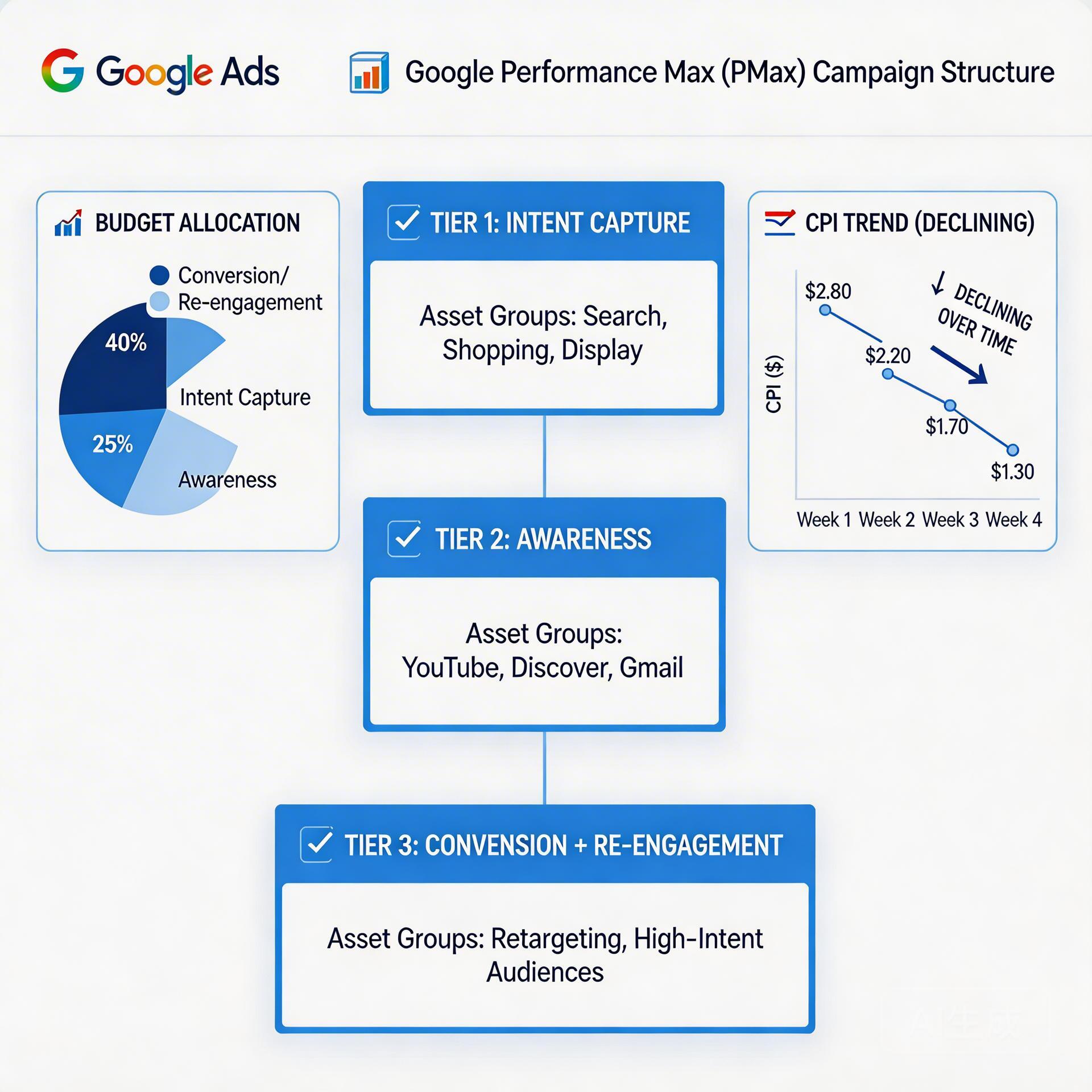
The most effective PMax structure for PWA install campaigns uses three asset groups with distinct channel optimization logic:
Asset Group 1: Intent Capture (Search + Shopping)
Target audience signal: Custom intent audiences based on competitor app names, gaming/social app review searches, and “android game download” type queries.
Landing page: High-intent PWA install page — lead immediately with the install CTA. Users arriving from search have already made a near-decision. Remove all friction: no email capture, no video intro, just a clear value proposition and a prominent “Add to Home Screen” button.
Budget allocation: Start at 40% of campaign budget. This group drives the cleanest conversion signals and lowest CPI. Let the algorithm gradually shift more budget here as it learns.
Asset Group 2: Awareness Conversion (Display + YouTube)
Target audience signal: In-market audiences for mobile gaming, social apps, entertainment. Layered with demographic targeting for your highest-LTV user profile.
Landing page: Context-matched PWA landing page — lead with gameplay video (BC gaming) or use-case story (social apps). Softer conversion goal: free trial start or “preview” CTA before the install prompt. This warms up Display traffic before asking for the install commitment.
Budget allocation: Start at 35% of budget. Track micro-conversions (video completion, 30s session) as secondary conversion events to give PMax better optimization signals for this intent tier.
Asset Group 3: Re-engagement (Gmail + Discovery)
Target audience signal: Previous visitors to your PWA landing page who didn’t install. Remarketing list uploaded to PMax audience signals.
Landing page: Return-visitor PWA page — show “Welcome back” messaging with a limited-time bonus offer or feature highlight. This group will have the lowest volume but highest CVR and lowest CPI of the three groups.
Budget allocation: Start at 25% of budget. CPI for re-engagement asset groups is typically 40–60% lower than cold traffic groups — allocate enough budget to capture this efficiency.
For a comprehensive look at how Google’s PWA install campaign setup compares to the Play Store approach, see our Google Ads PWA install campaign guide.
Conversion Signal Stack: What to Track and Why
The most common PMax optimization mistake is using a single conversion event. A single event gives the algorithm one data point per user journey — which means it needs far more impressions before it can make meaningful optimization decisions.
For PWA install campaigns, configure a conversion stack with three tiers:
| Event | Conversion Value | Purpose |
|---|---|---|
| PWA landing page: 30s engaged session | $0.10 | Early intent signal — trains algorithm on what engaged traffic looks like |
| Install prompt shown | $0.50 | High-intent signal — user reached the install decision point |
| appinstalled event fired | $5.00 | Primary conversion — actual PWA installation completed |
| First app session (within 24h of install) | $15.00 | Quality signal — filters out passive installs |
This conversion stack gives PMax four optimization signals per user journey instead of one, which can reduce the learning phase duration by 30–40% and improve steady-state ROAS by 25–35%.
The progressive disclosure approach used in our progressive disclosure landing page guide applies directly to how you structure your PWA landing page to generate these staged micro-conversion signals.
Landing Page Speed: The CPI Multiplier Most Teams Miss
For PMax campaigns targeting Southeast Asia, South Asia, and LATAM markets (where BC gaming and social app growth is fastest), landing page speed is directly correlated with CPI in a way most advertisers haven’t measured.
Here’s the math: If 30% of your PMax traffic comes from markets where average mobile connection speeds mean your landing page loads in 4 seconds instead of 1.5 seconds, you’re paying full CPC for traffic that bounces before the install prompt appears. Google doesn’t refund clicks for slow landing pages.
Measured impact of landing page speed on PWA install CPI:
- LCP 1.0–1.5s: Baseline CPI
- LCP 2.0–2.5s: CPI +18%
- LCP 3.0–3.5s: CPI +41%
- LCP 4.0s+: CPI +67%
Speed optimization priorities for PWA install pages running PMax traffic:
- CDN with regional edge nodes covering your target markets — Asia-Pacific and LATAM coverage is non-negotiable
- Hero image under 80KB (WebP format), no CSS background-image for above-the-fold elements
- Install button rendered in pure HTML/CSS — no JavaScript dependency for the primary CTA
- Preconnect hints for any third-party domains used in critical path (Google Analytics, pixel domains)
For AI-driven landing page routing that automatically matches content to visitor intent, the framework in our Smart Traffic AI guide can be adapted for PWA landing page optimization.
Budget Allocation and Scaling Rules for PMax PWA Campaigns
PMax campaigns for PWA installs have a different scaling dynamic than Play Store campaigns because the conversion signal quality is higher and more granular. This allows faster learning and more predictable ROAS at scale.
Week 1–2 (Learning Phase): Set campaign budget at 3–5x your target daily CPI spend. High budget during learning gives PMax the impression volume it needs to exit the learning phase quickly. Expect high CPI and volatility during this period — don’t adjust bids or budget during the first 7 days.
Week 3–4 (Optimization Phase): Once campaign exits learning phase (indicated by “Learning limited” status going away), evaluate CPI by asset group. Asset groups performing within target CPI should receive increased budget allocation. Asset groups performing 2x target CPI should have audience signals narrowed before budget is increased.
Week 5+ (Scaling Phase): Increase budget in 15–20% increments to avoid triggering re-learning cycles. Monitor CPI at the asset group level weekly. Add new creative assets (not new asset groups) every 2–3 weeks to keep ad freshness scores high without disrupting optimization.
PMax Android PWA CPI Optimization Checklist
- ☐ Replace Play Store final URL with PWA landing page URL in all PMax asset groups
- ☐ Implement three-tier conversion stack in GA4 with appropriate conversion values
- ☐ Create three asset groups: Intent Capture / Awareness Conversion / Re-engagement
- ☐ Build dedicated PWA landing page for each asset group intent tier
- ☐ Run LCP speed test for target markets — optimize to <1.5s
- ☐ Set campaign budget to 3–5x daily CPI target for learning phase
- ☐ Do not adjust bids or budget in first 7 days
- ☐ After learning phase: evaluate CPI by asset group, reallocate to top performers
- ☐ Scale budget in 15–20% weekly increments post-learning
- ☐ Add new creative assets (not new asset groups) every 2–3 weeks during scaling
PMax + PWA is the highest-efficiency Android install campaign structure available in 2026. The teams that implement this correctly are driving CPI 30–50% lower than industry benchmarks while maintaining the user quality signals that enable further algorithmic optimization at scale.
Skip the app store. Go live instantly, keep 100% of your revenue.
ROiBest helps Android app teams launch PWAs — no review process, no 30% Google Play cut, and push notifications that work even after uninstall. Teams see up to 1.2x higher install conversion rates vs native app downloads.
发表回复