

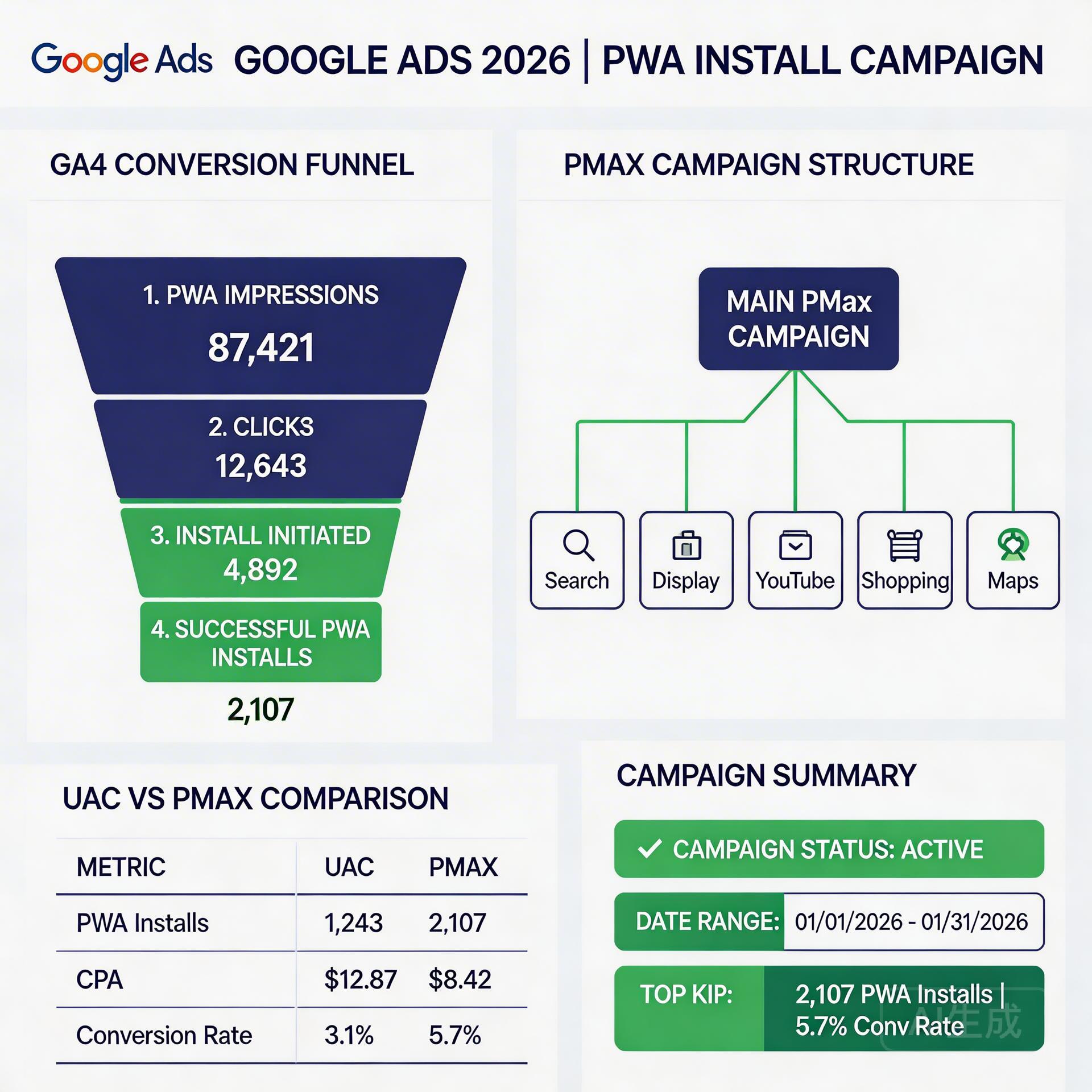
Running Google Ads for PWA installs has evolved significantly in 2026. What was once a workaround requiring custom tracking setups is now a fully supported, first-class campaign strategy — with Google’s Performance Max, Universal App Campaigns (UAC), and web install conversion events natively supported via GA4. But the playbook for maximizing PWA install rate from Google Ads has changed, and teams running campaigns from previous years’ frameworks are leaving significant performance on the table.
This is the fully updated 2026 edition of our Google Ads PWA Install Campaign Guide, covering everything that’s changed and the updated best practices for campaign structure, conversion tracking, landing page optimization, and post-install re-engagement.
→ Want to bypass Google Play entirely? See how ROiBest PWA works — no submission, no cut, 1.2x installs.
The 2026 Google Ads PWA Landscape: Key Changes
GA4 PWA Install Tracking Is Now Standard
Google Analytics 4 officially supports PWA install events (“app_install” for web-based PWA) as first-class conversion events that can be imported directly into Google Ads campaigns. This means your PMax or UAC campaigns can use PWA install as the primary optimization event with the same data quality as native app install campaigns. Previously, this required custom event implementation and workarounds — now it’s a configuration task, not an engineering project.
Performance Max Has Largely Replaced Standard UAC for New Campaigns
Google has moved most UAC inventory into PMax. While existing UAC campaigns continue running, new app install campaigns are now primarily launched as PMax campaigns. The optimization logic, audience targeting, and conversion tracking work similarly — but PMax adds cross-channel reach (Display, YouTube, Discover, Gmail) that pure UAC didn’t include, and the campaign management interface has changed significantly.
PWA Install Rate Now Directly Influences Campaign Quality Score
Google’s campaign quality scoring now incorporates landing page experience for web destination campaigns, including PWA install landing pages. A poorly optimized PWA landing page (slow load, poor message match, weak social proof) doesn’t just hurt install CVR directly — it also reduces campaign quality scores, increasing CPM and CPI. Landing page optimization is no longer just a conversion rate exercise; it’s a campaign cost management exercise.
Google Ads PWA Campaign Structure in 2026

The optimal campaign structure for Google Ads → PWA installs in 2026 has three components:
Component 1: Performance Max Campaign as Primary Driver
Configure your PMax campaign with:
- Primary conversion event: PWA install (ga_session_id + custom install event from GA4)
- Secondary conversion events: First in-app session, tutorial completion, first purchase/deposit
- Audience signals: Your highest-LTV installed user list (minimum 1,000 users); similar user segments from Google Analytics (users who completed first purchase)
- Asset groups: Minimum 3 asset groups, differentiated by audience intent stage (cold/warm/hot), not just by creative style
- Budget management: Start with a budget that allows ≥50 conversions/week for the algorithm to reach statistical significance; plan for a 2-week “learning phase” before evaluating performance
Component 2: Branded Search Campaign for Brand-Intent Traffic
Separate your branded search traffic from your PMax campaign. This is critical because PMax will absorb branded search queries if you don’t, reporting high ROAS on cheap conversions (users who would have found you anyway) and inflating your campaign performance metrics. A dedicated branded search campaign running at low CPCs captures this traffic efficiently and keeps your PMax budget focused on incremental, non-branded acquisition.
Google UAC campaign optimization tips for PWA 2026 →
Component 3: Re-Engagement Campaign for Post-Install Users
Once you have an installed user base, re-engagement campaigns targeting users who installed but didn’t complete a key action (first deposit, subscription start) recover a significant portion of the acquisition investment. Configure custom audiences in Google Ads based on your in-app events: “installed but no first_purchase in 7 days” is a high-value retargeting segment that has demonstrated intent without completing conversion. PWA push notification Google Ads re-engagement strategy →
Conversion Tracking for PWA Install Campaigns: The Complete Setup
Accurate conversion tracking is the foundation of any Google Ads campaign. For PWA, the tracking chain is: user clicks ad → lands on PWA install page → clicks “Add to Home Screen” → installs → completes in-app action. Each step requires a specific tracking implementation:
Step 1: GA4 Web Stream Configuration
Create a GA4 web data stream for your PWA domain. Configure the following events:
- app_install_initiated: Fires when user sees the install prompt (triggers immediately when beforeinstallprompt event fires)
- app_installed: Fires when user accepts the install prompt (use the appinstalled event listener)
- first_open: Fires when user opens the installed PWA for the first time (use the displaymode media query to detect standalone mode)
Step 2: Import GA4 Events Into Google Ads
In Google Ads → Tools → Conversions → Import → Google Analytics 4. Select your “app_installed” event as your primary conversion action. Set the conversion window to 30 days (most PWA installs happen within 24 hours of the ad click, but a 30-day window captures delayed decisions). Count: “once per click” to avoid repeat-install inflation.
Step 3: Configure In-App Conversion Events
For post-install optimization, import your in-app conversion events (first_purchase, subscription_start, tutorial_complete) as secondary conversion actions. Weight them by business value — a first purchase is worth significantly more than a tutorial completion for campaign optimization purposes. Use these secondary conversions to identify which audience segments produce the best post-install LTV, then feed that data back into your audience signals.
Landing Page Optimization for Google Ads PWA Install Traffic
Your PWA landing page is the conversion funnel for your Google Ads investment. Unlike app store listings, you have complete control — which means you also have complete responsibility for its performance.
The 2026 high-converting PWA landing page formula:
- Above-fold install CTA: The “Add to Home Screen” prompt or custom install button must be visible without scrolling on the smallest common screen size (iPhone SE / low-end Android). If a user has to scroll to find the install action, install rates drop 30–40%.
- Social proof before the CTA: Place your strongest proof element (user count, rating, specific outcome stat) within 200px above the install button. “4.8 stars from 12,000 installs” or “First win guaranteed in 5 minutes” outperforms generic taglines by 3–5x.
- Message match with the ad: Every word in your ad headline should have a direct counterpart in your landing page. If your ad says “No commission gaming app” — your landing page H1 should say “Play Without Paying Commission” or similar. Message breaks = conversion drops.
- Load speed under 2 seconds LCP: Google Ads quality scoring directly rewards fast-loading landing pages. Under 2 seconds LCP keeps quality scores high; above 3 seconds starts generating quality score penalties that raise your CPM.
- Device-specific install guidance: Some Android browsers (Samsung Browser, Opera) don’t show Chrome’s standard install prompt. Add a brief visual guide (2–3 steps, animated GIF) for users whose browser doesn’t trigger the automatic prompt.
PMax Budget Timeline: Understanding How Spend Evolves Over Campaign Life
PMax campaigns go through distinct spending patterns that affect PWA install efficiency:
Days 1–14 (Learning Phase): PMax is experimenting with channel mix, audience segments, and creative combinations. CPIs are typically higher and more volatile. Don’t make budget or targeting changes during this phase — you’ll extend the learning period. Let the algorithm gather data.
Days 15–45 (Optimization Phase): The algorithm has enough conversion data to make smarter decisions. Channel allocation begins to stabilize. This is when you should review your asset group performance and make any landing page improvements based on initial data.
Days 46+ (Scaling Phase): A stable, optimizing campaign. Budget increases of up to 20% per week are generally safe — larger increases can reset the algorithm’s learning. Creative refreshes every 4–6 weeks prevent audience fatigue without disrupting campaign performance.
Full PMax campaign PWA install optimization guide for Android →
UAC vs. PMax for PWA Installs: Which Performs Better in 2026
For teams still running UAC campaigns (existing campaigns, not new), the comparison with PMax matters:
UAC advantages (remaining): Simpler campaign structure, more predictable spending patterns, stronger focus on app-install-specific signals without the Display/Discover overhead of PMax.
PMax advantages: Broader reach across all Google inventory, more creative format options, potentially better cross-channel attribution, and Google’s ongoing investment in PMax over UAC (UAC is not receiving new features).
The consensus for new campaigns in 2026: launch as PMax with a tightly configured asset group structure and strong audience signals. For existing high-performing UAC campaigns, migration to PMax should be tested with a parallel campaign before full migration — some accounts see performance regression during migration that takes several weeks to recover.
Benchmarks: What Good Google Ads PWA Install Performance Looks Like
Reference benchmarks for well-optimized Google Ads PWA install campaigns in the gaming and AI app verticals:
- PWA landing page install CVR: 20–35% for Search traffic; 8–15% for YouTube; 3–8% for Display
- Cost per install (blended): $0.30–$1.50 for casual games; $0.80–$3.00 for BC games; $1.50–$5.00 for AI apps
- Post-install D1 retention: 45–65% for well-optimized first-session experience
- First purchase/deposit conversion (D7): 5–15% of installs for gaming; 3–8% for subscription apps
- Quality score: 7–10 for well-matched landing pages; below 5 indicates message mismatch or slow load speed
Creative Strategy for Google Ads PWA Campaigns: What Works in 2026
Creative performance in Google Ads PWA campaigns differs significantly from social ads. Google Ads users are in a more active intent mode — your creative needs to match and amplify that intent, not create it from scratch.
Top-performing ad formats for PWA install campaigns:
- Responsive Search Ads (RSA) for Search: Include the primary PWA benefit in at least 2 of 3 headline positions. Test headlines that emphasize “no download wait,” “no app store required,” or specific game features. Description fields should include social proof (number of players, specific achievement stats).
- Short demo videos (6–15 seconds) for YouTube: Show the core game loop or app value delivered within the first 3 seconds — before the skip option appears. The remaining time should show the install process (it’s fast, simple, tap to install).
- Image assets for Display: High-contrast, single-message creative performs better than complex multi-element banners. For gaming, in-game screenshots with a clear CTA (“Install Free”) outperform illustrated artwork.
Creative fatigue management: PWA install campaigns typically show creative fatigue after 3–4 weeks at scale. Rotate creative sets on a 3–4 week cycle, maintaining the best-performing creative while introducing 2–3 new variants. Abrupt creative wholesale replacements can disrupt algorithm learning — incremental rotation performs better.
Integrating Google Ads Data With PWA Retention Strategies
The Google Ads → PWA install funnel doesn’t end at the install event. The data you collect from your Google Ads campaigns should directly inform your post-install retention and re-engagement strategies:
Audience quality by campaign segment: Compare D7 retention and first-purchase rates for users acquired from branded search vs. non-branded search vs. YouTube vs. Display. This data tells you which acquisition channels are bringing you high-LTV users — and should inform your budget allocation, not just your install volume metrics.
Push notification segmentation by acquisition channel: Users who installed via Search-intent ads tend to respond to product-focused push messages (“New game mode available”); users who installed via YouTube tend to respond to social proof notifications (“10,000 players online now”). Segment your push notification strategy by acquisition source for better re-engagement rates.
Bid strategy alignment with LTV data: As your LTV data by acquisition segment matures (after 30–60 days), consider switching from maximize conversions bidding to target ROAS bidding, using your LTV data to set appropriate ROAS targets by channel. This shifts the campaign from install volume optimization to LTV-weighted optimization — the goal of any mature user acquisition program.
Advanced: A/B Testing Your PWA Install Landing Page With Google Ads Traffic
Because you fully control your PWA landing page (unlike a Play Store listing), you can run systematic A/B tests on Google Ads traffic. The testing framework:
- Use Google Ads URL customizers: Route different traffic segments (branded vs. non-branded, Search vs. YouTube) to different landing page variants using ValueTrack parameters in your final URL suffix
- Set up GA4 experiments: Use GA4’s built-in A/B testing to measure install event completion rates across landing page variants
- Run tests for minimum 100 installs per variant: Statistical significance requires volume — don’t call tests with less than 100 installs per variant, and allow at least 7 days to account for day-of-week variation
- Test one element at a time: CTA text, hero image, social proof placement, and install button color are all valid test variables — but isolating one variable per test is the only way to understand which change drove the result
Teams that run systematic landing page A/B tests typically find 15–30% CVR improvement opportunities within 3–4 test cycles — directly reducing their cost per install for the same ad spend.
Troubleshooting Common Google Ads PWA Campaign Issues
Even well-configured campaigns run into performance issues. Here are the most common problems and their diagnoses:
High impression share, low installs: Usually a landing page problem — either load speed, message mismatch, or install prompt friction. Check PageSpeed Insights (target LCP < 2.5s) and verify the install prompt fires correctly on multiple Android browsers (Chrome, Samsung Browser).
Conversions tracking but revenue isn’t reflecting it: View-through attribution inflation. Check your Google Ads attribution settings and compare attributed conversions against GA4 install events for the same period. A large gap (>30%) indicates you’re counting view-through conversions that don’t represent actual installs.
High CPI that won’t come down: Three root causes — low Quality Score (check landing page speed and relevance), learning phase disruption (avoid campaign changes during days 1–14), or audience signal mismatch (your audience signals don’t represent your actual high-LTV users). Diagnose in that order.
Strong initial performance that decays after 30–45 days: Creative fatigue. Rotate your top asset sets with fresh variants every 3–4 weeks. Don’t replace all creative simultaneously — swap 50% of assets to avoid resetting algorithm learning while refreshing delivery.
Algorithm over-allocating to Display with weak installs: Your conversion signal quality may be insufficient for the algorithm to distinguish Display from Search quality. Improve your GA4 conversion tracking (ensure high match quality), upload first-party audience signals, and add in-app events as secondary conversions to give the algorithm more quality signal to work with.
The Full Google Ads → PWA → Re-engagement Loop
The complete performance loop for Google Ads PWA campaigns, when fully implemented, creates a self-improving acquisition system:
- PMax campaign runs with strong audience signals → algorithm finds high-intent users → installs at target CPI
- Installed users complete first session → GA4 fires in-app events → events import back into Google Ads as secondary conversion signals
- High-LTV converter cohort builds → becomes next audience signal upload → improves campaign targeting quality
- Push notifications re-engage users who installed but didn’t convert within 7 days → PWA push subscriptions persist post-uninstall → re-engagement reach is broader than native app model
- Re-engaged users complete conversions → improve overall campaign ROAS → justify budget scaling → further improve algorithm learning
Teams that fully implement this loop report CPI reductions of 20–35% over 90 days compared to their initial campaign baseline, with corresponding improvements in ROAS as the audience quality compound improves.
Skip the app store. Go live instantly, keep 100% of your revenue.
ROiBest helps Android app teams launch PWAs — no review process, no 30% Google Play cut, and push notifications that work even after uninstall. Teams see up to 1.2x higher install conversion rates vs native app downloads.
发表回复