

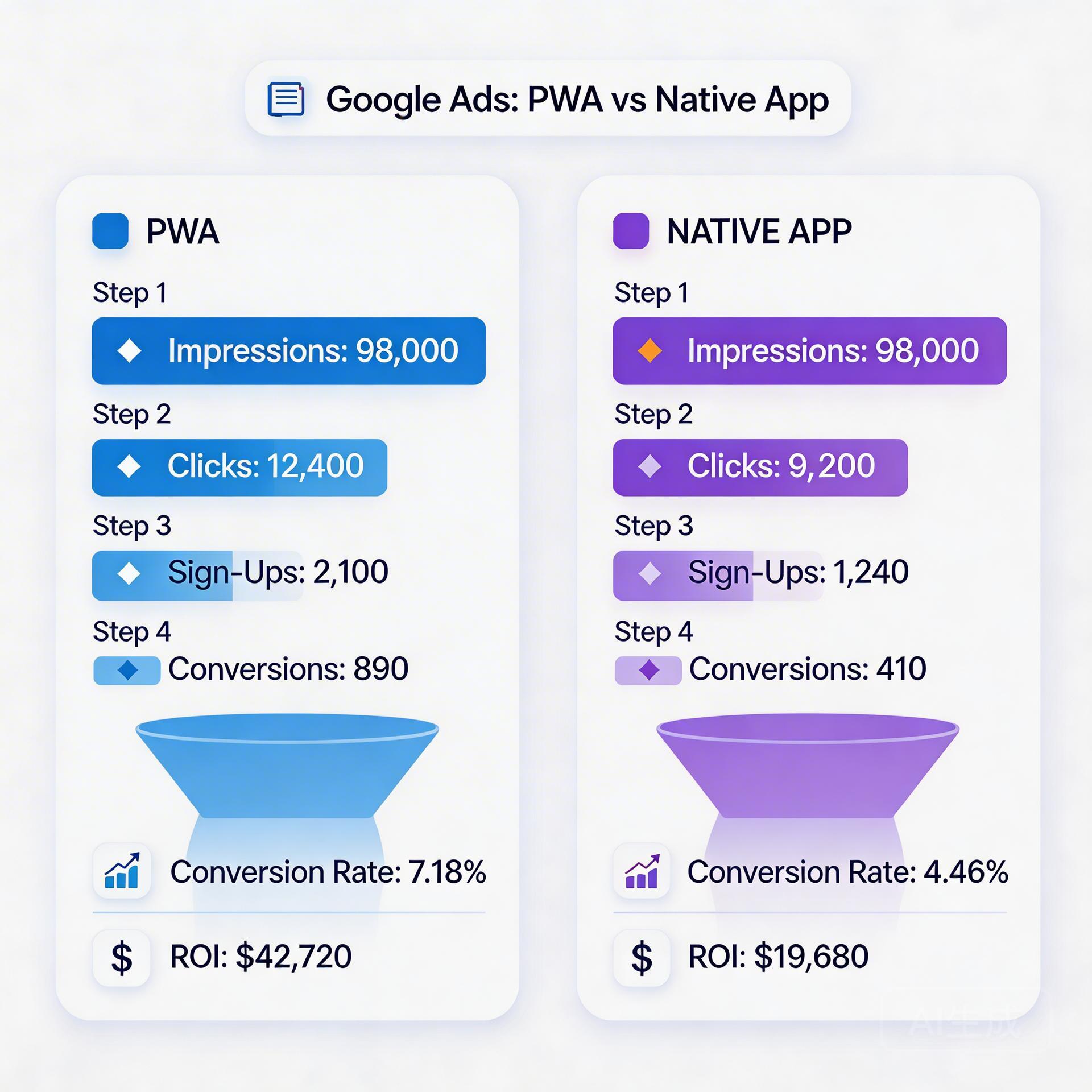
When you’re running Google Ads for app installs, the choice between sending traffic to a PWA or a native app install page isn’t just a technical decision — it’s a conversion rate decision. Data from teams running both in parallel shows consistent differences, and those differences directly affect your cost per install (CPI) and campaign efficiency. This guide breaks down the numbers and the mechanics behind why PWA outperforms native in specific Google Ads scenarios.
→ Want to bypass Google Play entirely? See how ROiBest PWA works — no submission, no cut, 1.2x installs.
The Core Conversion Rate Difference: Why PWA Wins on Paid Traffic
The conversion rate gap between PWA and native app installs via Google Ads comes down to one fundamental difference: friction in the install path.
When a Google Ads click hits a native app install page, the typical path is: ad click → Play Store listing → “Install” button → Play Store downloads app → user opens app. That’s 5 steps, each with drop-off. The download step alone introduces a wait time (anywhere from 10 seconds to several minutes depending on connection speed and app size) that loses a measurable portion of users.
When a Google Ads click hits a PWA landing page, the path is: ad click → landing page → “Add to Home Screen” prompt → app icon appears on home screen → user opens app. The install is near-instant — no download queue, no wait state. Users complete the action before they lose interest.
Observed conversion rate benchmarks from performance teams:
- Google UAC → Play Store install: 15–25% click-to-install (varies heavily by app size and market)
- Google Ads → PWA install: 22–35% click-to-install (same audience, same creative)
- Net difference: 1.1–1.5x higher CVR for PWA, depending on app category and target market
Step 1: Set Up Parallel Campaigns to Measure the Real Gap

The most reliable way to validate PWA vs native conversion rates for your specific app and audience is to run a properly structured A/B experiment:
- Create two identical ad groups in Google Ads — same creative, same bidding strategy, same targeting. One points to your Play Store listing, one points to your PWA landing page URL.
- Set equal daily budget splits for the first 14 days. You need enough data to see statistical significance — for most app categories, this means 500+ clicks per variant minimum.
- Track the same conversion event in both paths. For Play Store: use Firebase “first_open” as your conversion. For PWA: use the “appinstalled” browser event piped to GA4, which you then import into Google Ads as a conversion action. This apples-to-apples measurement is critical — many teams get this wrong by comparing different events.
After 14 days, your data will show the real conversion rate difference for your specific app. The PWA advantage tends to be strongest for: lightweight apps (where Play Store download time is longest relative to app utility), markets with slower connectivity (SEA, LATAM), and high-intent audiences from branded search campaigns.
Step 2: Optimize Landing Page Quality Score for Lower CPCs
Google Ads rewards landing pages that are fast, relevant, and provide good user experience — the same criteria that determine your Quality Score. A higher Quality Score means lower CPCs for the same ad rank. This is where a well-optimized PWA landing page has a significant structural advantage over the Play Store listing.
You own and control your PWA landing page. You can’t control the Play Store listing load time or layout. Here’s how to maximize Quality Score for your PWA page:
- Page speed is non-negotiable. Google measures landing page load speed directly for Quality Score. Target LCP under 2.5 seconds. Use GTmetrix or Google PageSpeed to benchmark — aim for 85+ score on mobile.
- Keyword relevance in landing page copy. Your primary keyword (e.g., “android game” or “ai social app”) should appear in the H1, meta description, and first paragraph. This signals relevance to Google’s Quality Score algorithm.
- Mobile UX signals. Low bounce rate and time-on-page signal good user experience. An install prompt that appears at the right moment (after 8–12 seconds or one interaction) keeps users engaged rather than bouncing immediately.
Internal reference: Google Ads PWA Install Campaign: Complete 2026 Guide — full campaign setup from targeting to conversion tracking.
Step 3: Bid Strategy Differences for PWA vs Native Campaigns
The bidding mechanics differ importantly between PWA and native app install campaigns:
Native app campaigns (UAC): Google Ads auto-optimizes towards in-app events using your Firebase data. The algorithm needs 50+ conversion events per week to enter “learning phase” completion and optimize efficiently. For many campaigns, this threshold takes 2–3 weeks to hit.
PWA campaigns (standard Search/Display/Performance Max): You’re optimizing towards a web conversion event (appinstalled). This unlocks more granular bidding controls — tCPA (target cost per acquisition), tROAS, or Max Conversions — and you can set the conversion window to match your retention data. The algorithm often ramps faster because web conversion events are more frequent and easier to track than app events.
Recommended starting setup for PWA campaigns:
- Campaign type: Performance Max (for reach) or App-style Display (for audience targeting control)
- Bidding: Max Conversions for first 2 weeks, switch to tCPA once 50+ conversions logged
- Target CPA: start 20–30% above your historical native app CPI to give the algorithm headroom; tighten after data accumulates
Step 4: Post-Install Tracking and LTV Attribution
The one area where PWA campaigns historically lagged native was post-install attribution — understanding whether a PWA install led to meaningful in-app engagement. GA4 has largely closed this gap:
- Fire GA4 events from your PWA’s web views using standard dataLayer pushes. Track: appinstalled, first_session, purchase, level_complete (or your equivalent engagement events).
- Import these events into Google Ads as secondary conversion actions. This gives your Google Ads campaigns the same LTV signal that native UAC gets from Firebase.
- Create retention cohorts in GA4 for PWA installs vs Play Store installs. Compare D7, D14, D30 retention. For most gaming apps, you’ll find PWA users are slightly more engaged in early sessions — possibly because the frictionless install selects for higher-intent users.
Internal reference: Mobile Game Google Ads PWA Install Campaign Guide 2026 — specialized setup for gaming app PWA campaigns with tROAS optimization.
The Verdict: When to Use PWA, When to Use Native
| Scenario | Better Channel | Reason |
|---|---|---|
| Low connectivity markets (SEA, LATAM) | PWA | Faster install, no download wait |
| Branded search campaigns | PWA | High intent users, max CVR matters |
| AI/social app with Play Store risk | PWA | No suspension risk |
| Deep game LTV optimization (UAC) | Native | Firebase signals richer for long LTV |
| Remarketing/retargeting existing users | PWA | Push works post-uninstall |
Skip the app store. Go live instantly, keep 100% of your revenue.
ROiBest helps Android app teams launch PWAs — no review process, no 30% Google Play cut, and push notifications that work even after uninstall. Teams see up to 1.2x higher install conversion rates vs native app downloads.
发表评论